How to connect the server webhook
Report sales your tag cannot see (renewals, late captures, phone orders) with a signed call from your own server, and read every reply it gives back.
By Nora Ellis, Affiliate Marketing & Creator Economy Writer · with Wooly Network, Advertiser Success · 3 September 2026 · 11 min · Tracking & Attribution
Your tracking tag already reports sales. This section is for the sales it cannot see; the ones confirmed somewhere no browser is present. A subscription renewing at 3am, a payment captured hours after checkout, an order taken over the phone, a signup your own backend completes.
It is the one thing on the Integration setup page that needs a developer, and the one thing that can pay a commission twice if it is wired up wrong. So this guide is written to be handed to whoever writes your backend code, and it says plainly what goes wrong and how to avoid it.
First: do you actually need this?
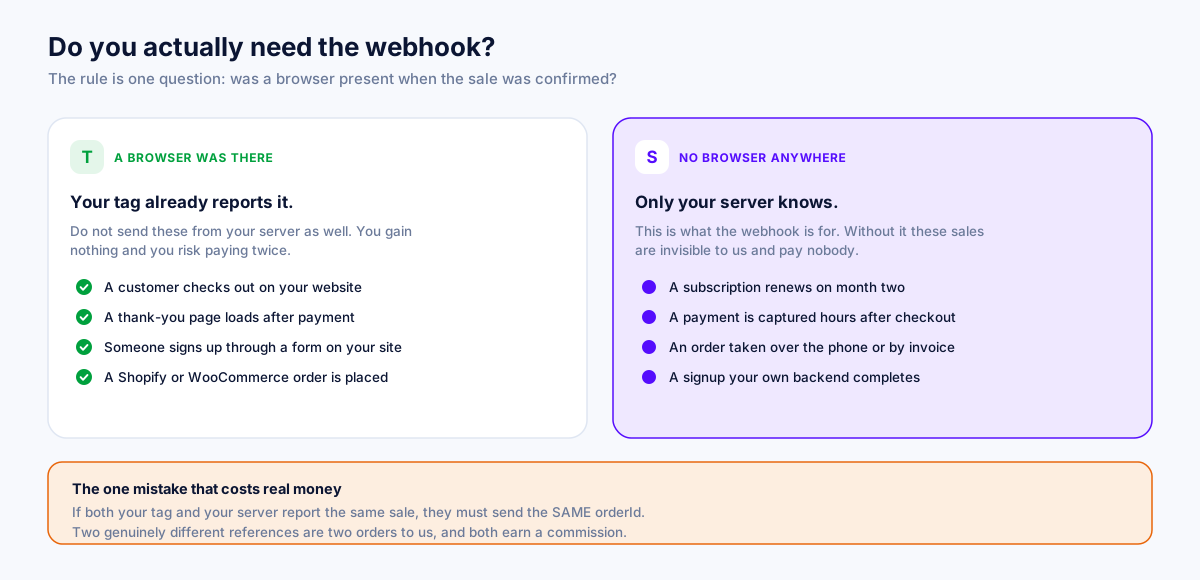
If a customer's browser is on a confirmation page when the sale completes, your tag already reports it and you should not send it again. Reporting the same sale twice gains you nothing and risks paying twice.
Send it from your server only when there is genuinely no browser:
- A subscription renews on its own schedule.
- A payment is captured hours or days after the order was placed.
- An order is taken over the phone, or invoiced.
- A signup is completed by your backend, not by a form on a page.
The one mistake that costs real money. If your tag and your server both report the same sale, send the same
orderIdfrom both. We recognise a repeat and count it once. Two genuinely different strings are two orders, and both earn a commission. We spot that pattern and tell you when it happens, but we cannot merge them afterwards; merging references that merely look related would join genuinely different orders.
Use your customer-facing order number, the same one your tag sends: #1001, not Shopify's gid://shopify/Order/…, and not your payment gateway's transaction id. Spelling differences we do reconcile: #1001 and 1001 are one order to us.
Step 1: Capture the click reference at checkout
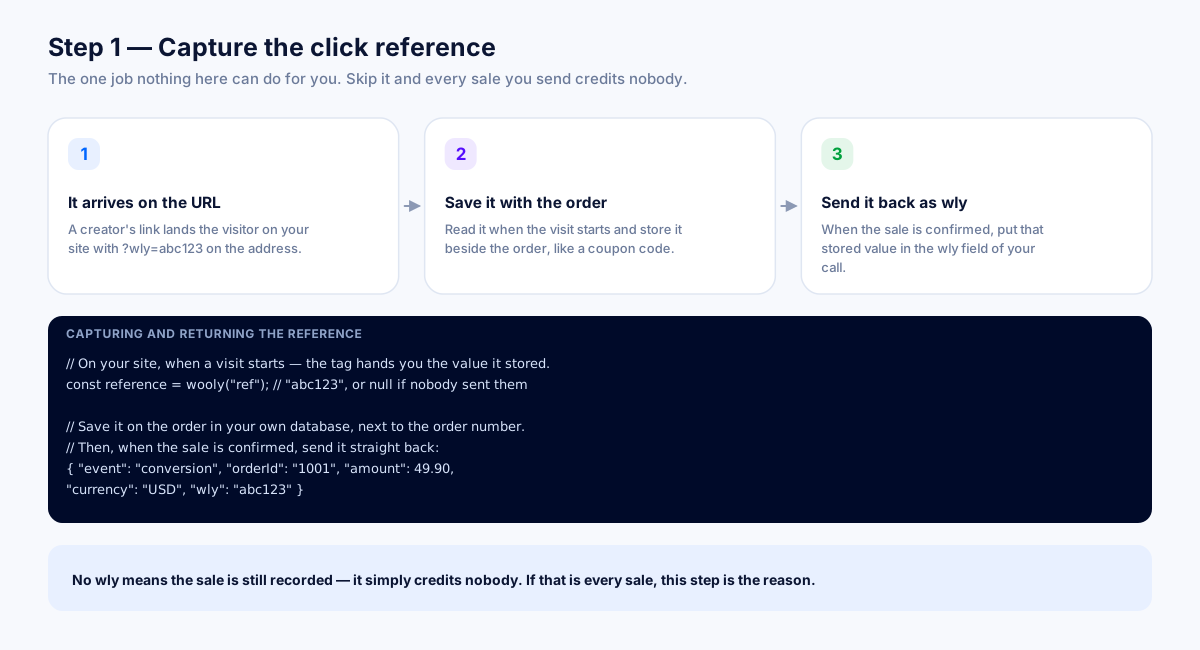
This is the one job nothing here can do for you, and it comes before you touch the address.
A browser knows which creator sent the visitor. Your server does not. So the browser has to hand it over, and your order has to carry it.
- Someone arrives from a creator link. The reference is on the URL:
?wly=abc123. - Read it and store it against the order. Either take it off the query string yourself, or ask the tag for it, the tag exposes
wooly("ref"), which returns the reference it is holding for this visitor, including one saved from an earlier visit. - When your server reports the sale, send that value back in the
wlyfield.
// On your site, at checkout const ref = window.wooly ? wooly("ref") : new URLSearchParams(location.search).get("wly"); // save `ref` on the order in your database // Later, from your server { "event": "conversion", "orderId": "#1001", "amount": 149.00, "currency": "USD", "wly": "abc123" }No wly does not break anything: the sale is still recorded and your totals are still right. It simply credits nobody. Most orders on most shops genuinely have no creator behind them, so that is often correct, but if it is every order, this step is not wired in.
Step 2: Turn the switch on and copy your address
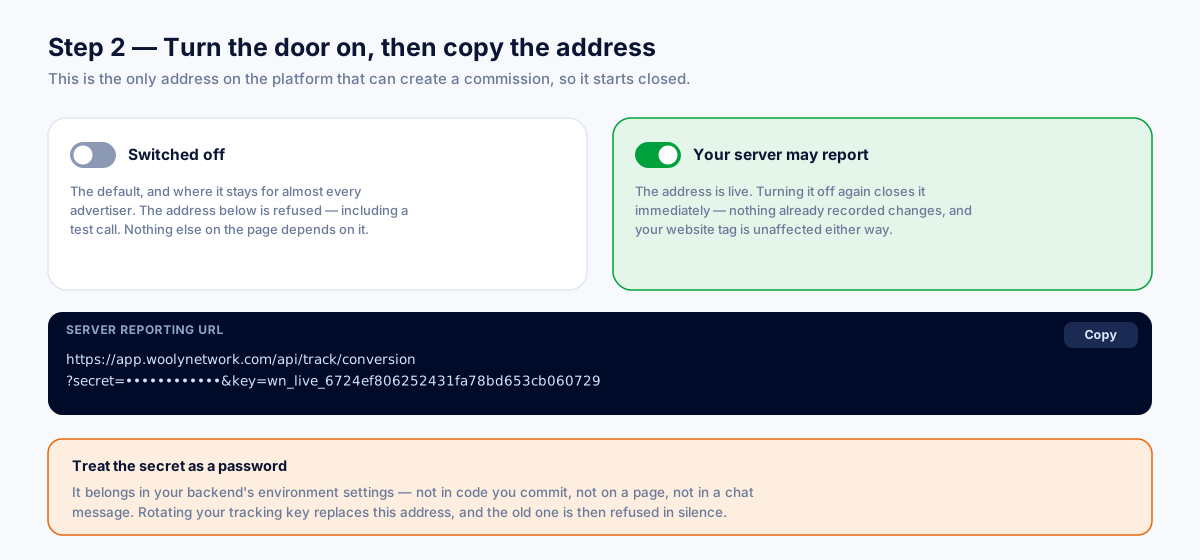
The address is refused until the switch is on. Turning it off again closes it immediately; nothing already recorded changes, and your tag is unaffected either way. That switch is your whole rollback.
With it on, copy the server reporting URL:
https://your-domain.com/api/track/conversion?key=wly_live_ab12cd34&secret=••••••••••••Same rule as everywhere else on this page: key= is public and merely names your account, secret= is a password. It goes in your backend's settings or your secret manager and nowhere else, never on your website, never in a repository, never in an email.
The address changes if you rotate your tracking key. If you rotate, come back and paste the new one into your backend.
Step 3: Sign the exact bytes you send
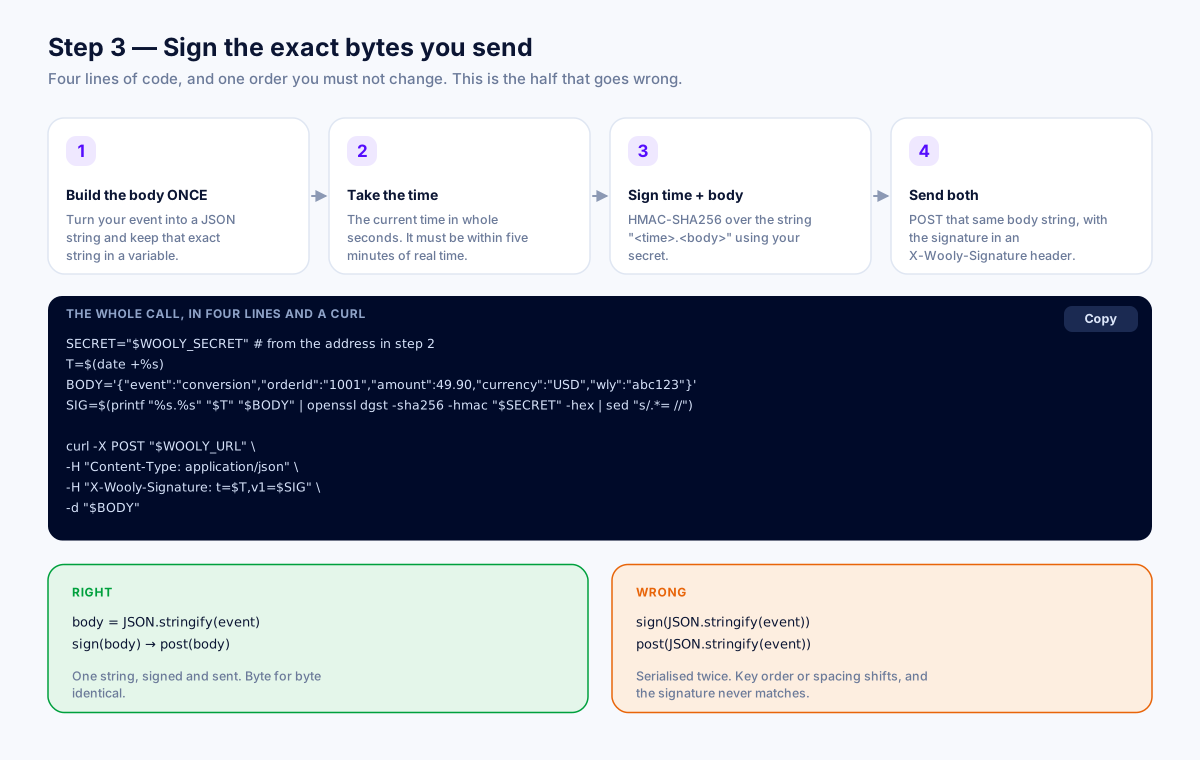
This is the half that goes wrong, and it goes wrong the same way every time. Four things happen in order:
- Build the body string once. Serialise your JSON into a string and hold onto that exact string.
- Take the current time in epoch seconds.
- Sign
time + "." + bodywith HMAC-SHA256, using your secret as the key, and hex-encode it. - Send both: the same body string as the request body, and the header
X-Wooly-Signature: t=<time>,v1=<signature>.
SECRET="$WOOLY_SECRET" T=$(date +%s) BODY='{"event":"conversion","orderId":"#1001","amount":149.00,"currency":"USD","wly":"abc123"}' SIG=$(printf "%s.%s" "$T" "$BODY" | openssl dgst -sha256 -hmac "$SECRET" -hex | sed "s/.*= //") curl -X POST "https://your-domain.com/api/track/conversion?key=...&secret=..." \ -H "Content-Type: application/json" \ -H "X-Wooly-Signature: t=$T,v1=$SIG" \ -d "$BODY"Right and wrong
Right: body = JSON.stringify(payload) → sign body → post body.
Wrong: sign JSON.stringify(payload), then let your HTTP library serialise payload again. The second serialisation can reorder keys or change spacing, the bytes differ by one character, and the signature will never match. It fails on every single call and looks like a wrong secret.
If your platform cannot add a header at all, the panel's last example signs a fixed list of fields instead. Use it only if the others are genuinely impossible.
Step 4: Send a test event
Step 4 in the panel gives you a ready-made signed call that cannot cost anything. It sends a custom event with no amount and no click reference, so there is nothing to credit and nothing to pay:
BODY='{"event":"wooly_test","orderId":"wooly-test-1"}'It proves the three things that actually go wrong: the address is right, the secret is right, and your signature covers the exact bytes you sent. It is also what unlocks campaign creation on this account.
Two notes. The switch has to be on first, a closed door refuses everything, including a test. And change the orderId if you send it twice; the same reference twice comes back as duplicate, which is the retry protection working, not a failure.
Every status and every reply, explained
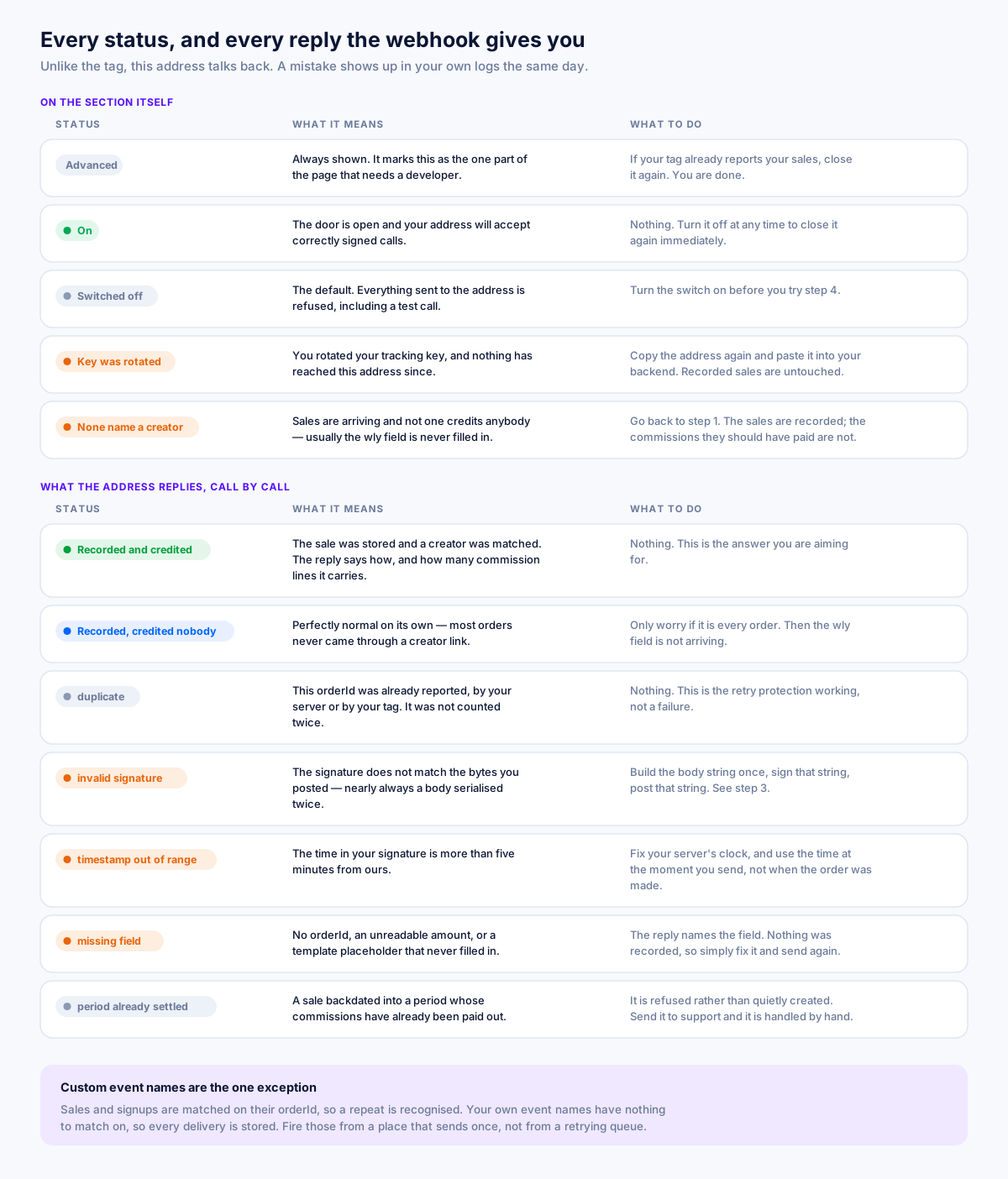
The badges on the section header
- Advanced (grey): always shown. It means this needs a developer, not that anything is wrong.
- On (green): the switch is on and the address is live.
Notices inside the section
“Switched off.”
The address refuses everything. Nothing else on the page depends on this, so if you never turn it on, nothing is missing.
“Your tracking key was rotated, and nothing has reached this address since.”
The rotation replaced this address too, so your backend is posting to one that no longer exists and is being refused in silence. Copy the address in step 2 again and paste it into your backend. Sales already recorded are untouched and every commission they earned stands; what stops is anything your server has tried to report since.
“Your sales are arriving, but none of them name a creator.”
Shown when a long run of reported sales has credited nobody; no click reference, no coupon, nothing. Some sales genuinely have no creator behind them, but a whole run without a single one usually means the wly field is not being filled in. Go back to step 1. Nothing is lost: those sales are recorded and your totals are right. What is missing is the commission each one would have paid.
What the address replies
Unlike the tag, this address talks back, so a mistake shows up in your own logs instead of going quiet for a month.
- Recorded and credited. The reply says how it was matched and how many commission lines it carries.
- Recorded, credited nobody. A normal answer for an organic order. Worrying only if it is every order.
- Duplicate. The same reference has already been recorded, a retry, or the same order arriving from both your server and your tag. It is recognised and not counted again. This is the protection working.
- Missing signature / malformed signature / bad signature. The header was absent, unreadable, or did not match the body. A bad signature over a correct-looking body is nearly always the double-serialisation mistake in step 3.
- Timestamp out of range. The
t=value is more than five minutes from our clock. Check the clock on the machine making the call. - No event name. Send
eventasconversion(a sale),lead(a signup), or your own name for a custom event. - No reference. Send
orderIdfor a sale, the same value your refund call will send, orleadIdfor a signup. Without one, a retry would be recorded and paid a second time. - The reference is a template that never filled in. Something like
{{order.id}}arrived literally. Nothing was recorded, because every call from that integration would otherwise carry the same string and collide with the first one. - Unreadable amount or currency. The amount must be a positive number; the currency must be a three-letter ISO code like
USD. - Time in the future, or unreadable. Send an ISO 8601 timestamp, or epoch seconds or milliseconds, or leave the field out entirely and we will stamp it on arrival.
- Period already settled. A sale backdated into a period whose commissions have already been paid out is refused rather than quietly created; it would create money inside a settlement that has already left. Send it to us and we will handle it by hand.
Every rejection records nothing at all. There is no half-written sale to clean up.
Custom event names are the one exception to de-duplication. Sales and signups are matched on their reference, so a repeat is recognised. Your own event names have nothing to match on, so every delivery is stored, and a webhook queue that retries for hours will store one row each time. It cannot pay anything or move a balance, but it will inflate your counts and your activity feed. Fire custom events from somewhere that sends once.
Worked examples
A subscription that renews monthly
A customer signs up through a creator link in January. Your checkout page's tag reports the first payment; you also save wly=abc123 on their subscription record. Every renewal after that happens with no browser anywhere, so your billing job posts a signed conversion with a fresh orderId (#SUB-1001-FEB, #SUB-1001-MAR) and the same wly. Each renewal credits the same creator, and no renewal collides with another.
A payment captured the next day
An order is authorised at checkout and captured 18 hours later by your payment provider's webhook. Your tag never sees the capture. Your server reports it with orderId: "#1001"; the same order number the tag would have used. If your tag did already report #1001, the reply comes back as a duplicate and nothing is double-counted. That is the safe outcome, and it is why the order number matters.
A phone order
No browser, no tag, no click reference, the customer called you. Your server reports it with an orderId and an amount, and no wly. The reply says recorded and credited nobody. That is exactly right: nobody sent this customer.
Troubleshooting
- Every call comes back as a bad signature. You are signing one string and sending another. Build the body string once, sign it, post it: with no re-serialisation in between.
- Everything is refused in silence. The switch is off, or the address is a pre-rotation one. Copy step 2 again.
- Sales are recorded but no creator ever gets paid. The
wlyfield is empty. Go back to step 1. - An order paid two commissions. Your tag and your server sent two different
orderIdvalues for the same order. Align them on your customer-facing order number, then contact us about the pair already created. - Your custom event count keeps climbing. A retrying webhook queue. Custom events are not de-duplicated; fire them from somewhere that sends once.
Do you have to remove the tag?
No, and usually you should not. Removing it turns off exactly two things (the tag test, and the alert that tells you your site has gone quiet), because both read events from a browser specifically. Nothing else changes: sales are recorded, attributed and paid exactly as before, the badge at the top of the page reads connected via your server, and campaign creation stays open. One proved route is all the account is ever asked for.
A short checklist
- Only send what your tag cannot see.
- Capture
wlyat the landing page and store it on the order. - Turn the switch on, then copy the address. Treat
secret=as a password. - Sign
time + "." + bodyover the exact bytes you post. - Fire the test event in step 4 and read the reply.
- Use the same customer-facing
orderIdyour tag uses, always.
Related reading
- Affiliate Fraud: How to Spot It and Stop It — The six schemes that actually cost advertisers money, the signals that expose each one, and a review process that catches them without accusing honest partners of anything.
- What Is a Cookie Window in Affiliate Marketing? — The number that decides whether a partner gets paid: how windows work, what length suits your category, why browsers shortened them, and the resets and overlaps that cause most disputes.
- Last Click vs First Click Attribution: Which One Pays the Right Partner? — Why last click quietly overpays coupon sites and underpays the content that created the demand, what the alternatives actually cost to run, and how to test incrementality without rebuilding your stack.
More from the Wooly Network Knowledge Library