PartnerStack vs Impact: Which Partner Platform to Choose
A neutral comparison of the two best known partner platforms: who each one is built for, how pricing works, and when neither is the right fit.
By Nora Ellis, Affiliate Marketing & Creator Economy Writer · with Wooly Network, Editorial · 10 October 2026 · 14 min · Affiliate Marketing
PartnerStack vs Impact is mostly a question of what you sell. PartnerStack is built for B2B SaaS companies managing affiliates, referral partners and resellers, with quote based annual pricing and deal registration from its entry plan. Impact.com is a broader partnership platform used heavily by ecommerce and consumer brands, with public tiers from $30 a month (Starter), $500 (Essentials) and $2,500 (Pro), plus transaction based fees and a large partner marketplace. B2B software with a sales team usually leans PartnerStack; retail, travel, finance and consumer apps usually lean Impact.
Last checked October 2026. Pricing and features change, so confirm on each vendor's site before you sign. We refresh this page every three months.
Both platforms are mature, well reviewed and widely used, and both have customers who would defend them in a pub argument. The useful comparison is therefore not "which is better" but "which one matches the shape of your partner program." This page works through the differences that decide that: pricing structure, partner types, marketplace access, tracking, payouts, contracts and the effort to run each one. A section near the end covers the cases where neither is a good fit.
PartnerStack vs Impact: how do they compare at a glance?
| Dimension | PartnerStack | Impact.com |
|---|---|---|
| Core audience | B2B SaaS companies; "the only affiliate platform built for B2B" per its pricing page | Brands of many sizes, from small ecommerce stores (Starter) to large multi channel programs (Enterprise) |
| Pricing model | Quote based; plans Launch, Growth, Enterprise confirmed in a demo | Public tiers: Starter from $30 a month, Essentials from $500, Pro from $2,500; Enterprise by quote |
| Usage based fees | A fee on partner commissions is reportedly charged; not published | 2.5% transaction fee on partner driven transactions; Essentials charges 20% on payouts above $2,500 a month |
| Setup fee | Not listed | One time fee depending on onboarding resources; amount not published |
| Partner types | Affiliate, referral, reseller, co sell and influencer partners | Affiliates, influencers, publishers, B2B partners and more |
| Marketplace | PartnerStack Marketplace from Launch; 131,000+ active partners per its homepage | Partner Marketplace from Essentials, "90,000 partners"; keyword discovery on Pro |
| Deal registration | Yes, from Launch, with CRM integrations | Not a headline feature on the self serve tiers |
| Tracking scope | Referral links, sign ups and billing transactions; lead and deal registration | Links and promo codes (Starter); unlimited events incl. app installs (Essentials); cross device and API (Pro); call and offline (Enterprise) |
| Partner withdrawal fees | Stripe $2.25 plus 0.25% (max $20); PayPal 2% (max $20) | Domestic bank transfer free; PayPal 2% (up to $20); international wire varies |
| Minimum withdrawal | $5, manual withdrawal | $10, automatic on a threshold or fixed day schedule |
| Contract | Annual reportedly standard | Monthly fee, annual payment available; sales led deals reportedly annual or multi year |
| G2 rating | About 4.7 out of 5 from roughly 920 to 940 reviews | About 4.4 out of 5 from roughly 2,400 reviews |
G2 ratings are from G2 listing snapshots in October 2026; G2 blocks automated checks, so treat review counts as approximate.
How much does PartnerStack cost compared with Impact.com?
The two vendors take opposite approaches to price transparency, and that alone shapes the buying process.
Impact.com pricing
Impact.com now publishes its first three tiers on its pricing page. Older articles that say impact.com pricing is not public are out of date.
- Starter, from $30 a month. Self serve. Billing help docs describe the fee as "the greater of 2.5% of the total monthly revenue of locked partner costs or $30 USD," with a credit card required. For the first 30 days there is no minimum fee unless partners drive sales.
- Essentials, from $500 a month. Sold through a demo. The help center says it includes $2,500 in partner payouts at no additional cost, and partner payouts above that are charged at a 20% rate (for self serve sign ups; sales led accounts may differ).
- Pro, from $2,500 a month. Sold through a demo, adding cross device tracking, API based tracking and Data Lab.
- Enterprise, contact sales. Third party reviews reportedly put enterprise contracts around $50,000 a year and note that sales led contracts can be annual or multi year. Impact.com does not publish this.
Its FAQ also says a 2.5% transaction fee applies only to partner driven transactions, and that there is a one time onboarding fee depending on the technical resources required, with no amount listed. The self serve plans require an ecommerce integration (Shopify, BigCommerce, WooCommerce, Adobe Commerce or Squarespace), which is a useful hint about who those tiers are designed for. Our Impact.com alternatives guide walks through what each tier costs at different program sizes.
PartnerStack pricing
PartnerStack publishes plan names (Launch, Growth, Enterprise) and features but no prices: "Your final plan and pricing are confirmed during your demo." Partners and internal users are unlimited on every plan. Third party data points:
- Uppercut reports a start of about $1,500 a month billed annually (around $18,000 a year), with Enterprise around $3,000 to $5,000 or more a month.
- Vendr reports a median annual spend of $19,616 across 62 purchases, with a range of roughly $9,186 to $37,770.
- Review sites report an additional fee on partner commissions, with estimates from about 3% to 15%. This is not on PartnerStack's site, so it should be a line item you ask about explicitly.
What that means in practice
An illustration, not a quote. Say a program pays $10,000 a month in partner commissions on $100,000 of partner driven revenue.
| Platform and tier | Published or reported cost logic | Approximate monthly platform cost |
|---|---|---|
| Impact.com Essentials (self serve terms) | $500 base, includes $2,500 of payouts, 20% on the other $7,500 | About $2,000 |
| Impact.com Pro | From $2,500 a month; usage fees per contract | From $2,500, plus any transaction fees in your contract |
| PartnerStack | Reported $1,500 a month billed annually, plus any fee on commissions | About $1,500 to $1,635 before any commission fee |
Two caveats. First, how the 2.5% transaction fee in impact.com's FAQ interacts with each tier depends on the contract, so we have not stacked it on top here; ask for a worked invoice. Second, the PartnerStack range is the Uppercut starting estimate and the Vendr median divided by twelve. Neither vendor has confirmed either scenario, and procurement teams that negotiate tend to land below list. The structural point holds: impact.com cost rises with partner volume in a published way; PartnerStack cost is mostly fixed per contract and negotiated up front.
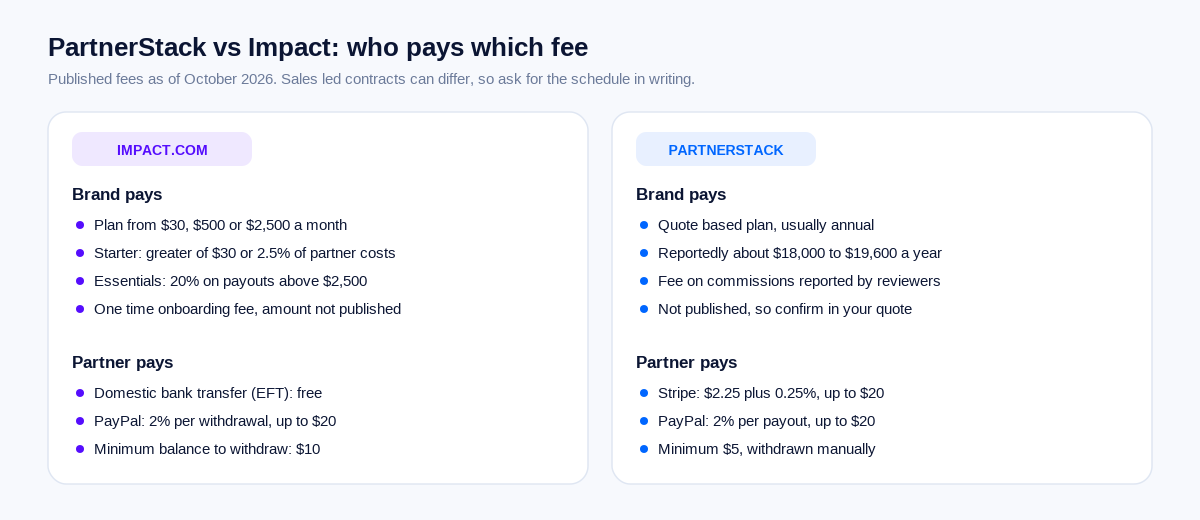
Fees fall on both sides of the program, so compare the partner column too.
Who is each platform built for?
PartnerStack: the B2B SaaS partner team
PartnerStack's homepage calls it a partner relationship management platform for B2B SaaS companies to recruit, engage and scale "affiliates to referral and reseller partners." The feature list follows that: lead and deal registration with CRM integrations on Launch; a learning management system, challenges, MDF management and advanced segmentation on Growth; custom workflows and a designated customer success manager on Enterprise. If your partners include agencies who implement your software, consultants who refer deals to your account executives, and affiliates who write comparison posts, PartnerStack is designed to treat each group differently inside one program.
Impact.com: the multi channel partnership program
Impact.com positions its tiers by maturity: Starter for small ecommerce brands, Essentials for growing brands, Pro for established programs and Enterprise for large, multi channel partnership programs. It cites more than 4,000 brands. The feature depth on the upper tiers is in measurement: unlimited event types (conversions, leads, app installs, bookings) on Essentials, cross device and API tracking on Pro, and call, offline and data post tracking, fraud scoring and partner deduplication on Enterprise. That fits retail, travel, subscription boxes, fintech and telecom programs that work with coupon sites, loyalty portals, content publishers and creators at once.
Which has the bigger partner marketplace?
Size figures come from each vendor and are measured differently, so compare them loosely.
- PartnerStack states 131,000+ active partners on its homepage as of October 2026, and marketplace access is included from the Launch plan. The marketplace is B2B oriented: partners there are looking for software to recommend or resell.
- Impact.com includes Partner Marketplace access from Essentials, described as "90,000 partners: affiliates, influencers, and beyond." Starter gets automated partner recommendations instead, and keyword search for partner discovery arrives on Pro.
The more useful question is fit, not headcount. A B2B analytics tool will find more relevant partners in PartnerStack's marketplace; a skincare brand will find far more in impact.com's. Neither marketplace recruits for you: you still need a clear offer, and our guide on how to recruit your first 10 affiliates applies on either platform.
How does tracking compare?
PartnerStack uses a JavaScript snippet that reads a partner key from a cookie set on the referral click, creates a customer record at sign up, and attaches later transactions (first payment, renewals, upgrades) to that customer. Its integrations page lists connectors including Stripe, Chargebee, Recurly, HubSpot and Salesforce. This model is well suited to subscription revenue and long sales cycles, because the customer, not the click, is the unit that earns commission over time.
Impact.com tracks a wider set of events and channels. Starter covers link and promo code tracking with 40+ reports; Essentials adds unlimited event types and multi domain programs; Pro adds cross device and API based tracking; Enterprise adds call tracking, offline conversions, CPC tracking, fraud scoring, attribution risk protection and partner deduplication. If you need to reconcile a creator, a coupon site and a cashback portal all touching the same order, this is where impact.com's depth shows.
For a refresher on cookies, server events and attribution windows before you sit through either demo, see how affiliate tracking works.
How do payouts work, and who pays the fees?
Both platforms handle partner payments for you, and both pass some cost to partners. The details differ.
PartnerStack
- Commissions are typically paid out on the 13th of each month; some companies use custom schedules.
- Partners need at least $5 and must withdraw manually.
- Partner fees: Stripe $2.25 plus 0.25% per payout (maximum $20); PayPal 2% (maximum $20); direct deposit through Airwallex in about 75 countries, with fees varying by country, currency and amount.
Impact.com
- Partner balances become eligible for withdrawal at $10, and partners choose a balance threshold or a fixed day (the 1st or 15th) schedule.
- Domestic bank transfers (EFT) are free; PayPal withdrawals carry a 2% processing fee up to $20; international wires carry currency specific fees.
- Impact.com's partner help center notes a monthly account maintenance fee if it cannot pay a partner for six months because of missing tax or payment details.
- On the brand side, Essentials includes $2,500 of payouts each month and charges 20% above that on self serve terms.
For partners with a domestic bank account, impact.com is usually cheaper to be paid on. For brands, the cost picture depends almost entirely on your contract, which is a sentence procurement teams will recognize.
Contracts, onboarding and learning curve
Contracts. PartnerStack contracts are reportedly annual. Impact.com lists monthly fees with an annual payment option on its pricing page, while third party reviewers report that sales led contracts are often annual or multi year. Starter can be started with a credit card.
Onboarding. Impact.com charges a one time onboarding fee scaled to the technical resources needed (no amount published). PartnerStack does not list a setup fee; ask whether implementation support is included in your quote.
Learning curve. Both are deep products and neither is a weekend install. Reviewers commonly describe impact.com as powerful but complex to configure, which follows from its range of tracking options and contract structures. PartnerStack's interface is narrower in scope because it focuses on SaaS partner workflows, but deal registration, partner groups and CRM sync still need an owner. Budget a named person on your team, not "whoever has time on Fridays."
PartnerStack vs Impact: which should you choose?
| Your situation | Usually the better fit | Why |
|---|---|---|
| B2B SaaS with account executives, resellers and agencies | PartnerStack | Deal registration, CRM sync and partner type specific onboarding from the entry plan |
| Ecommerce brand on Shopify or WooCommerce, starting out | Impact.com Starter | Self serve, from $30 a month, ecommerce integrations built in |
| Consumer brand wanting creators, coupon and content publishers | Impact.com Essentials or Pro | Larger consumer marketplace, unlimited event types, cross device on Pro |
| Consumer app or fintech tracking installs and leads | Impact.com | App install, lead and booking events from Essentials |
| B2B SaaS with mainly affiliates and review sites, no resellers | Either; compare quotes | PartnerStack's B2B marketplace vs impact.com's predictable published tiers |
| Large enterprise with call, offline and multi brand programs | Impact.com Enterprise | Call and offline tracking, fraud scoring, partner deduplication |
| Under a few thousand dollars a month in partner revenue | Possibly neither | See the next section |
When is neither PartnerStack nor Impact the right fit?
Both platforms are built for programs that already work, or that have budget and staff to make them work. A sizable share of companies searching "partnerstack vs impact" are earlier than that, and an annual contract or a $500 a month floor is a lot to pay while you find out whether partners will promote you at all. Common situations, with options worth a look:
- You bill through Stripe and want the simplest possible affiliate tracking. Rewardful starts at $49 a month (Starter, up to $7,500 a month in affiliate revenue) with a 0% transaction fee and a 14 day free trial, according to its pricing page. FirstPromoter has a similar entry at $49 a month. Our Rewardful vs Dub vs Wooly Network comparison goes deeper.
- You want developer friendly links plus a partner program. Dub's Business plan is $90 a month and includes Dub Partners, with brand paid payout fees (5% by ACH on Business and Advanced) and a $2,500 monthly payout cap on Business. See our Dub Partners alternatives for the trade offs.
- You want creators to find you rather than recruiting every partner yourself, on public monthly pricing. Wooly Network is a creator and affiliate marketplace with brand plans from $99 a month (Growth) and $249 a month (Scale), no setup fee, no network minimum and cancel anytime; creators join free and payouts run monthly through Stripe. It is a newer marketplace and does not offer deal registration or partner enablement modules. Our Wooly Network vs PartnerStack and Wooly Network vs Impact comparisons set out where it fits and where it does not.
- You want a traditional network with a large publisher base. Awin's US Access plan is listed at $49 a month plus 3.5% per transaction, with a three month minimum.
- Cash is the constraint. Our list of affiliate networks with no setup fee covers nine options that do not ask for money before the first sale.
On Wooly Network: brands can see every plan on the pricing page and try a campaign demo on the advertiser page before signing up, which makes it a reasonable low cost test before committing to a larger partner platform.
None of these replace what PartnerStack or impact.com do at scale. They are the right answer when the honest description of your program is "promising, small, and owned by one busy person." Start there, measure, and move up when the program pays for the software. If you want a broader view of how networks and platforms differ, our guide to affiliate networks compared lays out the categories.
A short checklist for either demo
- Ask for a worked invoice at your current and projected partner volume, including every percentage fee.
- Ask what the partner pays to withdraw, in each country where your top partners live.
- Ask for the contract term, the auto renewal clause and the notice period.
- Ask what implementation costs, and who on their side does it.
- Ask how recurring commissions, refunds and downgrades are handled, and see it in the product, not on a slide.
- Ask which marketplace partners in your category are active today. A number for the whole marketplace tells you little.
If you are earlier than either platform assumes, compare public plans with no setup fee and run a small test first; the data from three months of real partner sales will make the bigger decision much easier.
Common questions
Is PartnerStack or Impact better for B2B SaaS?
PartnerStack is usually the better fit for B2B SaaS with a sales team, because it offers lead and deal registration, CRM integrations and separate onboarding for affiliates, referral partners and resellers from its entry plan. Impact.com can work for SaaS, especially consumer apps, but its self serve tiers are designed around ecommerce integrations.
How much does impact.com cost in 2026?
According to impact.com's pricing page in October 2026, Starter is priced from $30 a month, Essentials from $500 a month and Pro from $2,500 a month, with Enterprise by quote. A 2.5% transaction fee applies to partner driven transactions, Essentials charges 20% on partner payouts above $2,500 a month on self serve terms, and there is a one time onboarding fee.
Does PartnerStack publish its pricing?
No. PartnerStack's plans (Launch, Growth, Enterprise) are priced during a demo based on program size, features and support. Uppercut reports a starting point around $1,500 a month billed annually, and Vendr reports a median buyer spend of $19,616 a year.
Which platform charges partners lower withdrawal fees?
For partners with a domestic bank account, impact.com is usually cheaper: domestic EFT withdrawals are free, while PayPal costs 2% up to $20. PartnerStack charges $2.25 plus 0.25% (maximum $20) for Stripe withdrawals and 2% (maximum $20) for PayPal, with direct deposit fees varying by country.
What are the G2 ratings for PartnerStack and Impact?
Based on G2 listing snapshots in October 2026, PartnerStack rates about 4.7 out of 5 from roughly 920 to 940 reviews, and impact.com rates about 4.4 out of 5 from roughly 2,400 reviews. Review counts change often, so check G2 directly before relying on exact figures.
What is a good alternative to both PartnerStack and Impact for a small program?
It depends on the setup: Rewardful or FirstPromoter for simple Stripe based SaaS tracking from $49 a month, Dub for link management plus partners from $90 a month, Wooly Network for a creator marketplace from $99 a month with no setup fee, or Awin for a traditional network from $49 a month plus 3.5% per transaction.
Keep reading
- Impact.com alternatives for startups and growing brands
- Wooly Network vs PartnerStack for SaaS affiliate programs
- Wooly Network vs Impact.com: which affiliate platform fits?
- Rewardful vs Dub vs Wooly Network for startups
- Affiliate networks with no setup fee
- Best affiliate networks compared: how to choose the right one
Related reading
- Affiliate Platform Comparisons and Alternatives — Honest side by side comparisons of the affiliate networks and partner platforms brands shortlist most, with pricing, fees, contracts and who each one suits best.
- Dub Partners Pricing Explained: Plans, Payout Fees, Limits — What each Dub plan includes for affiliate programs, how payout fees and monthly payout caps change the real cost, and a worked example at three sizes.
- Affiliate Networks With No Setup Fee: 9 Options for Startups — Where the real costs hide in affiliate pricing, from deposits and minimums to payout fees, and the networks that let you launch without an entry ticket.
More from the Wooly Network Blog