Affiliate Marketing for Shopify Stores: Apps, Setup and Commission Rates
How to run affiliates on Shopify without losing margin to discount stacking: app comparison with real fee structures, the discount code trap, and the tracking gaps checkout creates.
By Nora Ellis, Affiliate Marketing & Creator Economy Writer · with Wooly Network, Advertiser Success · 21 September 2026 · 7 min · Performance Marketing
To run affiliate marketing on a Shopify store you need three things: a way to give each partner a unique tracked link or discount code, a way to record the order against that partner at checkout, and a payout process. A Shopify app handles all three for a single store, while an affiliate network adds partner discovery and handles payouts across brands.
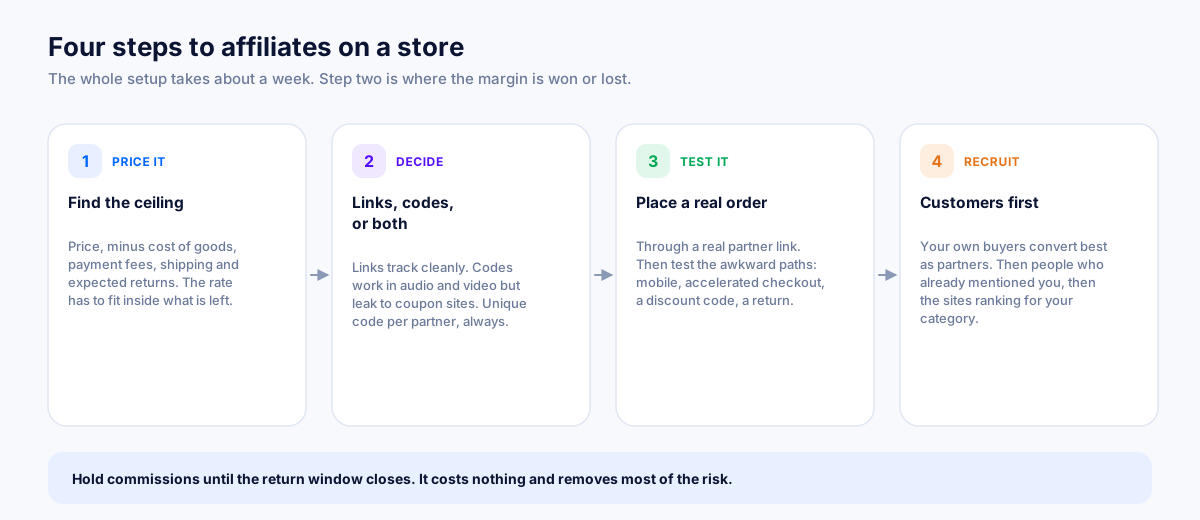
The setup is short. The decisions inside step two are where the margin goes.
App or network: what you are actually choosing between
This is the first fork, and it is not really a features comparison. It is a question about where your partners come from.
| Shopify app | Affiliate network | |
|---|---|---|
| Lives in | Your store admin | A shared marketplace |
| Finds partners for you | No, you recruit | Yes, partners browse and apply |
| Payouts | You pay each partner | Consolidated, handled centrally |
| Works across sales channels | Usually web only | Web, app, in-store where instrumented |
| Cost shape | Monthly fee, sometimes plus a revenue fee | Platform fee or a share of commission |
| Best when | You already have partners to onboard | You need to find partners |
Plenty of stores run both, and that is a perfectly sensible end state: an app for the fifteen creators you personally recruited, a network for reach beyond people you already know. If you want the longer version of the network side, read what is an affiliate network and how does it work.
The Shopify app landscape, honestly
There are more than forty affiliate apps in the Shopify App Store and most stores end up looking at the same four. The differences that matter are the fee structure and the fraud tooling, not the feature list.
| App | Fee shape | Known for | Weak spot |
|---|---|---|---|
| UpPromote | Free tier, then monthly, plus a small revenue fee on some plans | The popular all-rounder, strong recruiting and MLM tiers | Attribution options are thinner than enterprise tools |
| GoAffPro | Very generous free tier, cheap paid tiers | Unlimited affiliates on free, fast to launch | Reporting depth, and support at scale |
| Refersion | Higher monthly, no revenue share on core plans | Deep tracking, integrations, built for larger catalogues | Roughly four times the entry price of the cheap options |
| Shopify Collabs | Free to install, with a payout processing fee | Native, gifting plus codes plus commission in one place | The lowest user ratings of the major options |
Read that fee column twice. A percentage fee on affiliate revenue is a second commission sitting on top of the one you are already paying. On a store doing $40,000 a month through the channel, a 2% platform fee is $800 a month, which is far more than any of the flat monthly plans. Cheap monthly plus a revenue fee is usually the expensive option once you succeed.
For comparison, Wooly Network charges brands a flat monthly plan with no percentage of your store's affiliate revenue, plus a published operational fee on creator payouts. The numbers are on the affiliate marketplace pricing page. Brands that want to start free can send products to creators with a Paid Product Collab on the free plan.
Switching apps after launch costs real time, because links and codes have to be reissued and partners re-onboarded, so choose against where the store will be in twelve months rather than where it is this week.
The discount code trap
Most Shopify stores give affiliates a discount code because it is easy and because codes survive everything a link does not: they work in a podcast, on a billboard, on a screenshot, across devices, with cookies blocked. That is genuinely valuable.
The trap is what happens next. The code gets posted to a deal forum, the deal site starts ranking for "your brand discount code", and now a shopper who was already on your checkout page opens a new tab, finds the code, and applies it. You pay a discount plus a commission on a sale you already had.
Five defences, in order of how much they help:
- Write the sharing rules into the terms. State that codes may not be submitted to coupon aggregators, and that doing so voids the commission. Most creators will comply, because most creators are not the problem.
- Use unique codes per partner, never shared ones. Enforcement is impossible without knowing whose code leaked.
- Decide whether commission is on the pre-discount or post-discount total. Post-discount is the defensible answer. Say so explicitly, because partners assume the opposite.
- Pay coupon partners less than content partners. Different rates for different partner types is normal and it prices incrementality honestly instead of arguing about it later.
- Turn off code stacking in Shopify's discount settings so an affiliate code cannot combine with a site-wide sale. Two 20% discounts and a commission on the same order is a loss dressed as a conversion.
The related question, whether the partner deserved credit at all, is an attribution question and is covered in last click vs first click attribution.
Commission rates that survive Shopify economics
The constraint on a physical goods store is cost of goods, and it is much tighter than software people expect.
| Category | Typical commission | Why |
|---|---|---|
| Apparel and accessories | 10% to 20% | Healthy margin, but returns are high, so validate before paying |
| Beauty and skincare | 10% to 20% | Good margin and strong repeat purchase |
| Home and furniture | 5% to 10% | Large baskets, but shipping eats the margin |
| Electronics and gadgets | 3% to 8% | Thin margin, price-compared to death |
| Supplements and consumables | 15% to 30% | High margin, and repeat orders fund a bigger first payout |
| Digital products and print on demand | 20% to 40% | Almost no cost of goods |
Before you pick from that table, do the subtraction that actually decides it: price, minus cost of goods, minus payment fees, minus shipping, minus expected returns. What is left is your ceiling, and the commission has to fit inside it with room to spare. The full method is in how much should you pay affiliates.
One Shopify-specific note on returns. If your return rate is 25%, a commission paid on order placement means you are effectively paying 33% more than your headline rate. Hold commissions until the return window closes. Fourteen to thirty days is standard and no reasonable partner objects, provided it is written down.
The tracking gaps Shopify creates
Four places where orders quietly stop being attributed.
- Checkout extensibility. Shopify's checkout is locked down, and scripts that used to live on the thank you page now need the supported extension points. If your app or tag only fired on the old checkout scripts, conversions go missing without any error appearing anywhere.
- Shop Pay and accelerated checkout. A buyer who taps Shop Pay from a product page can skip steps your tracking expected to see. Test this path specifically, on a phone, not just the desktop happy path.
- Subscription apps. Recurring orders are created by the subscription app, not by a browser session, so they carry no click data. If you pay recurring commission, those orders have to be reported from your server.
- Draft orders and POS. Anything created outside the storefront has no referral attached unless somebody attaches one deliberately.
The general fix for all four is the same: report the conversion from the server side as well as the browser, so the browser is a convenience rather than the only witness. Server webhook setup and tracking tag installation cover both halves on Wooly, and how affiliate tracking works explains why one without the other leaves gaps.
A launch sequence that takes about a week
- Day 1. Work out your margin ceiling and set a rate. Decide pre-discount or post-discount, and decide the hold period against your return window.
- Day 2. Write the programme terms and the partner brief. Use the template in how to write an affiliate program brief so you are not answering the same five questions in every email.
- Day 3. Install your tracking, then place a real test order through a real partner link and confirm it appears with the right partner, the right amount and the right status.
- Day 4. Test the awkward paths: Shop Pay, mobile, a discount code order, a return.
- Day 5. Prepare partner assets. Product images, approved claims, the three products that actually convert, and any seasonal dates.
- Week 2. Recruit. Your own customer list first, since existing customers convert best as partners, then outward. The first 10 affiliates plan is the step-by-step version.
Where Wooly fits: if the hard part for you is finding partners rather than installing an app, Wooly Network puts your offer in front of creators who are already looking for products in your category, with tracking, validation and consolidated payouts handled centrally. Start with the campaign guide.
Common questions
Does Shopify have a built-in affiliate program feature?
Not as a core store feature. Shopify Collabs is the closest native option and focuses on creator partnerships with commission and gifting. For anything beyond that, stores use an app from the App Store or an external network.
Should affiliates get a link or a discount code?
Both, ideally. The link gives you clean attribution and works for content, the code works in audio, video and offline contexts where a link cannot be clicked. Just make sure an order does not pay commission twice when a shopper uses both.
Can I run an affiliate program on Shopify Basic?
Yes. Every affiliate app and network works on any Shopify plan. The plan affects transaction fees and checkout customisation, not whether you can track a referral.
How do I handle affiliates who are also customers?
Decide whether they may earn commission on their own orders and write it down. Most programmes say no, because self-referral is effectively a permanent personal discount, and it is much easier to state that up front than to claw it back.
Keep reading
- How to start an affiliate program for your business
- How much should you pay affiliates?
- Affiliate fraud: how to spot it and stop it
- How affiliate tracking works
- Best affiliate networks compared
Related reading
- Spark Ads and Partnership Ads: How Creator Whitelisting Works — Whitelisting lets a brand run ads through a creator's own account. Here is how Spark Ads codes and Meta Partnership Ads permissions actually work.
- Affiliate Marketing for Brands: A Complete Guide — What the channel is actually good at, what it is bad at, how to budget for it honestly, and the operating rhythm that separates a programme that compounds from one that flatlines.
- Affiliate Marketing vs Influencer Marketing: What's the Difference? — One pays for a result, the other pays for a slot. A breakdown of who carries the risk, what each one costs, how to measure them honestly, and why most brands end up running both.
More from the Wooly Network Blog