Brands Can Now Invite Creators: Wooly Network Becomes a Two Way Creator Marketplace
Brands can now find creators by niche, platform, country and audience, and invite them straight to an offer. Creators accept or decline in one tap and stay in full control of who can find them.
By Nora Ellis, Affiliate Marketing & Creator Economy Writer · with Wooly Network, Editorial · 3 October 2026 · 8 min · Product Update
Brands on Wooly Network can now find creators and invite them straight to an offer, and creators can accept or decline in a single tap. Until now, every partnership on the platform started the same way: a brand published an offer, and creators browsed the marketplace and applied. That still works exactly as before. What changes today is that the door now opens from both sides. A brand that knows the kind of creator it wants no longer has to wait to be discovered, and a creator with a strong profile no longer has to go looking for every opportunity alone.
This guide explains what brand invitations are, how brands send them, how creators answer them, what each side can see, and why this turns Wooly into a marketplace that works in two directions instead of one.
Key takeaways
- Find Creators is a new view in the brand Marketplace where advertisers search creators by niche, platform, country and audience size.
- A brand can invite a creator to any of its live offers, add a personal note, and choose to approve the creator automatically if they accept.
- Creators receive invitations in a new Invitations tab, with a notification, and can accept or decline with a reason.
- Creators stay in control: a Let brands find me switch decides whether they appear in Find Creators at all, and brands never see a creator's email or earnings.
- Nothing changes about how commissions are tracked or paid. An accepted invitation becomes a normal partnership on the offer's own terms.
What is a brand invitation on Wooly Network?
A brand invitation is a direct, personal request from an advertiser asking a specific creator to promote one of its live affiliate offers. It carries the full offer (commission, cookie window, approval type and platforms), an optional message from the brand, and, if the brand chooses, a promise of instant approval the moment the creator accepts.
Think of it as the reverse of an application. In an application the creator says “I would like to work with you.” In an invitation the brand says it first. Both lead to the same place: a tracked partnership where the creator earns commission on the results they send.
Why a creator marketplace should work in both directions
Most affiliate networks and influencer platforms are built around one motion. If you are weighing the two models, our comparison of affiliate marketing and influencer marketing explains how they differ. Either brands search a database of creators and run outreach, or creators scroll a list of offers and apply. Each model leaves value on the table.
- When only creators can start the conversation, brands with a precise audience in mind have to hope the right person finds them.
- When only brands can start the conversation, creators become a list to be prospected, and good creators with smaller audiences rarely get noticed.
A healthy marketplace lets both sides take the first step. Creators keep browsing and applying to the offers they like. Brands now get a second route: they can go and find the people who fit, and make them a clear, specific offer. The result is more relevant partnerships, formed faster, with less cold outreach on either side.
For brands
Stop waiting to be discovered
Publish an offer, then go and find the creators who fit it. Invitations work on every plan that includes publishing campaigns.
See how it works for brandsHow brands find and invite creators
Find Creators sits right next to Offers in the brand Marketplace. Every creator listed there has a complete profile and has chosen to be discoverable.
Step 1: Search and filter the creator directory
Start broad, then narrow down. Filter by niche, by the platform where the creator publishes, by country, and by audience size. Each card shows the creator's level, niches, country, platforms and audience range, so you can shortlist without opening a single profile. When you want more detail, View profile opens everything the creator has shared publicly. New to recruiting partners? Our guide on how to find affiliates for your business covers what a strong match looks like.
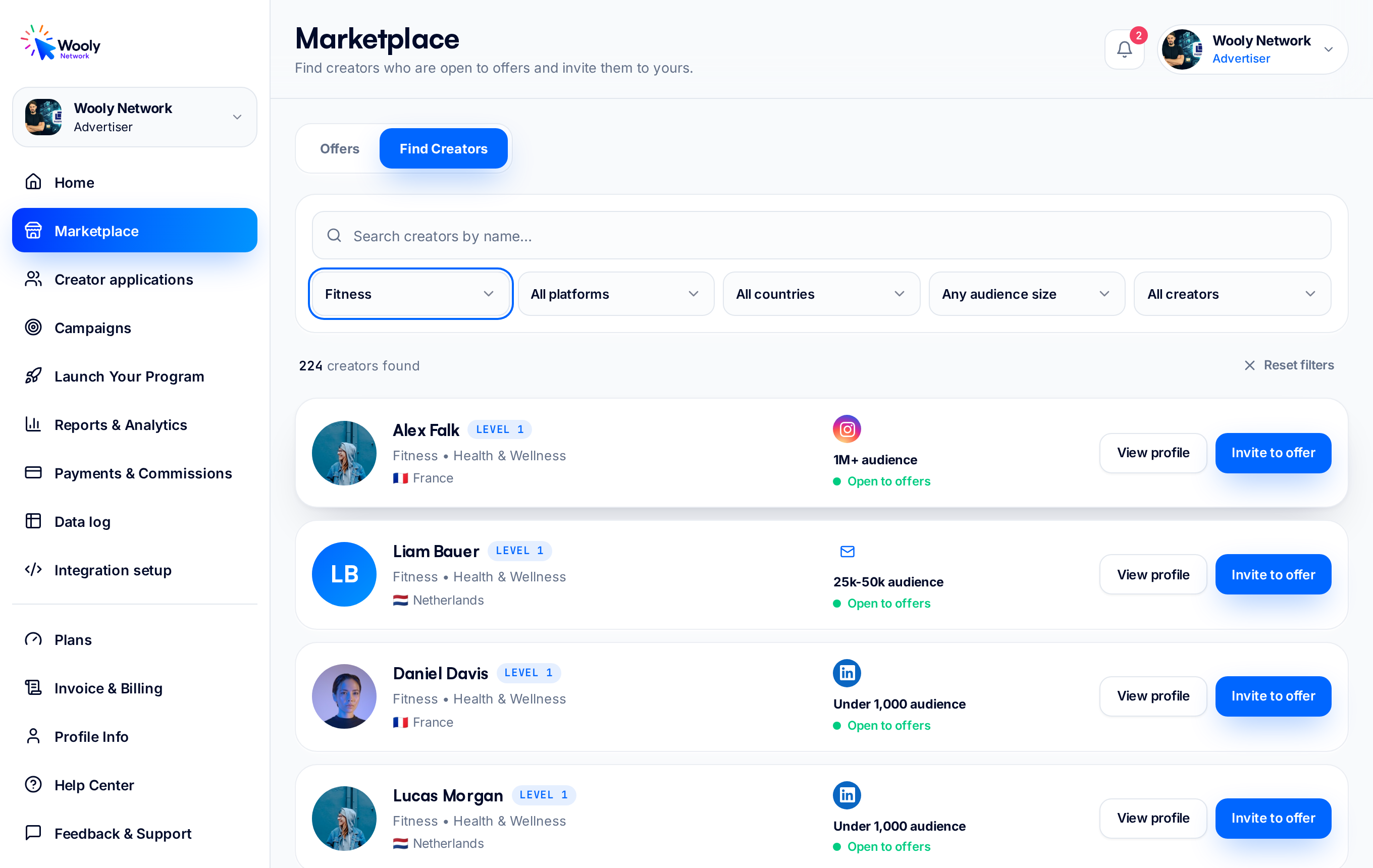
Find Creators, filtered to the Fitness niche. Every card shows niches, country, platforms and audience size, with an Invite to offer button.
Step 2: Choose the offer
Click Invite to offer and pick which of your live offers you are inviting the creator to. Each option shows its commission, category and approval type, so you can match the creator to the offer that suits their audience best. Offers where you already work with the creator, or where they have already applied, are marked clearly so you never send a duplicate.
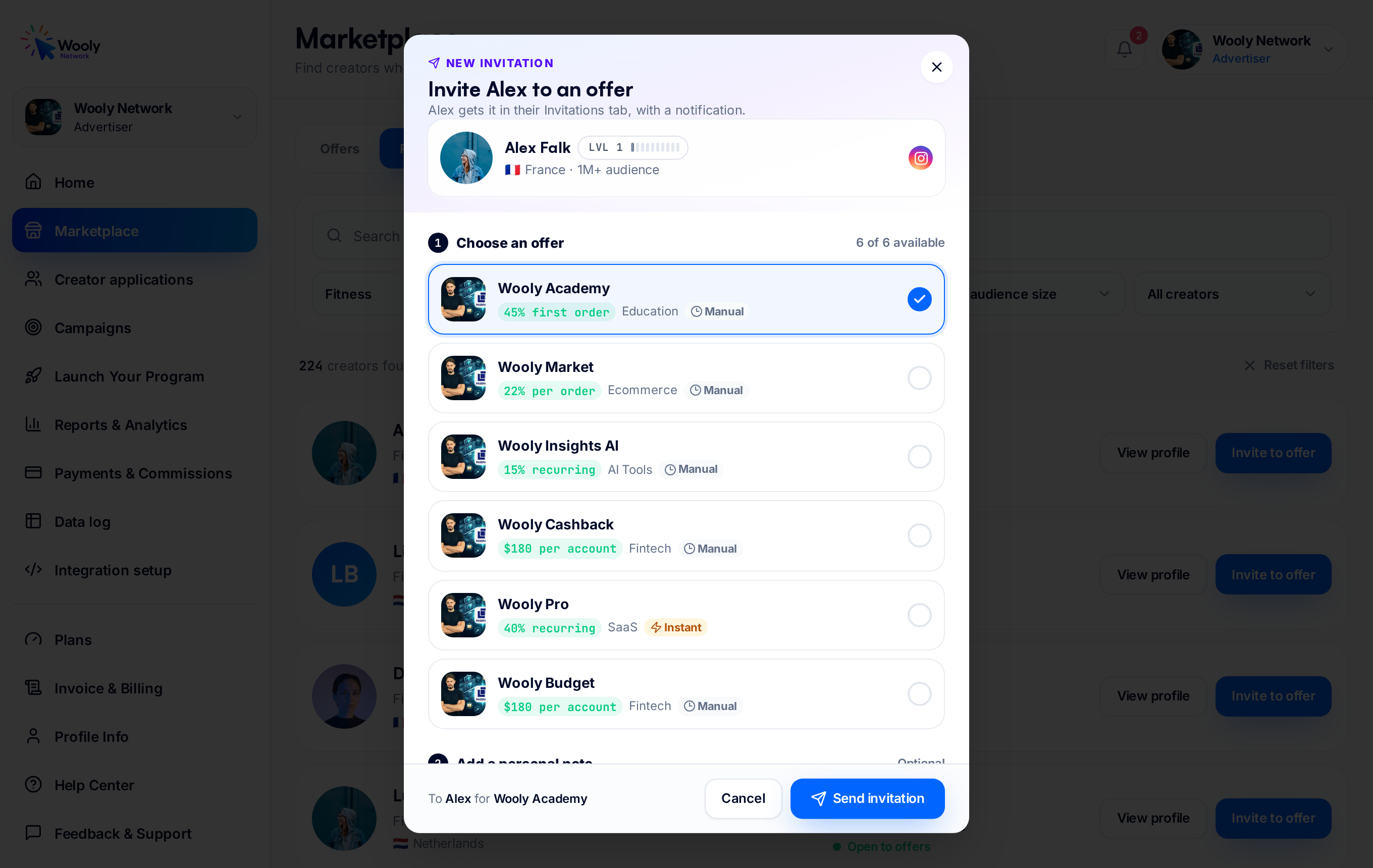
Choose the offer. The creator's summary stays at the top so you always know who you are inviting.
Step 3: Add a personal note and decide on approval
A short, specific note makes a real difference. Tell the creator why you chose them and what makes the offer worth their time. Then decide on approval. With Automatically approve if accepted switched on, the creator receives their tracking link the moment they say yes. Switch it off, and their acceptance arrives in Creator applications for you to review like any other applicant. Here is how to approve the right creators when you do.
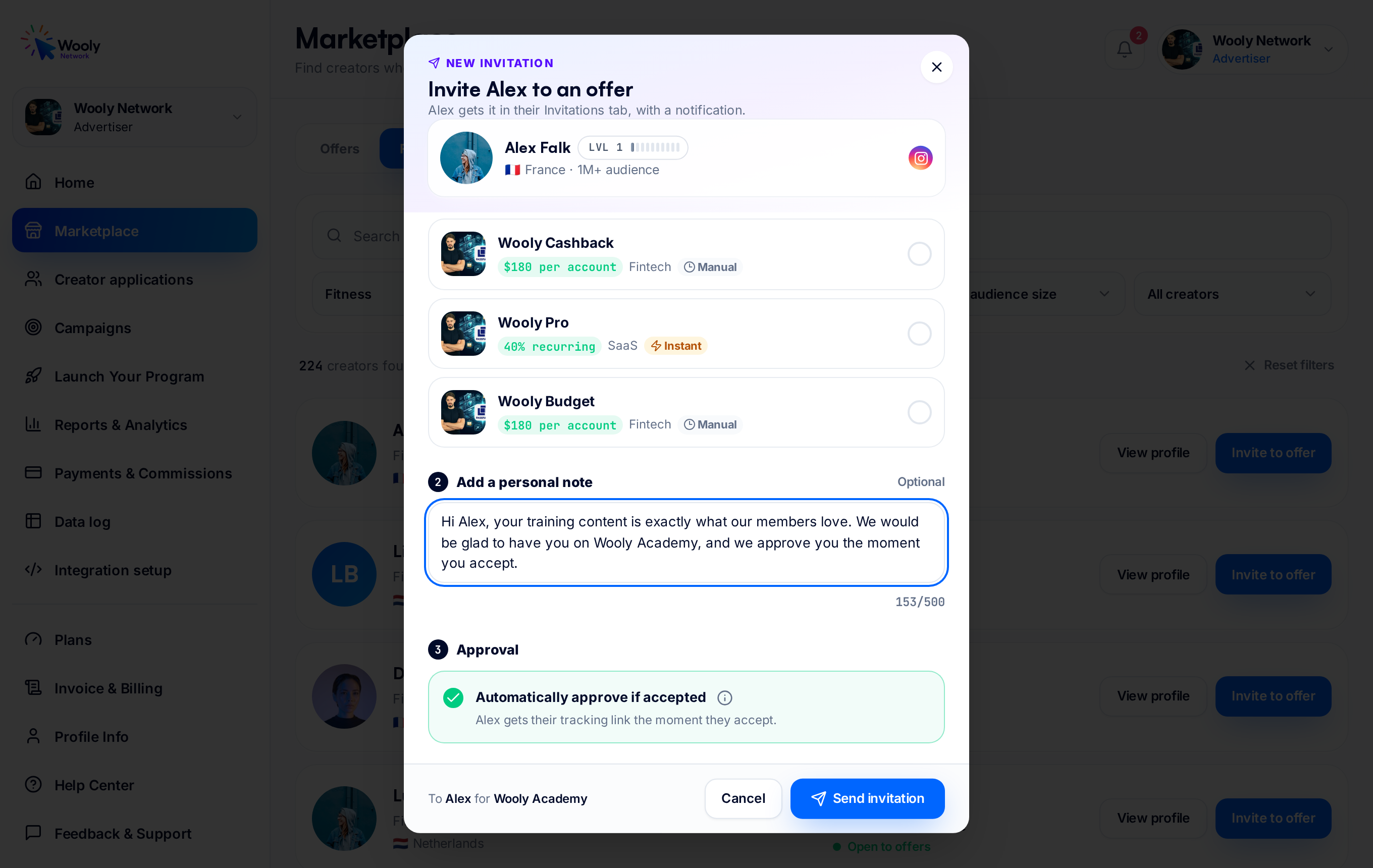
A personal note and automatic approval. The footer confirms who the invitation is going to and for which offer.
Step 4: Track every answer
Back in Find Creators, one filter shows you where every invitation stands: everyone you invited, invitations still waiting, invitations accepted, and invitations declined. If a creator declines, you see the reason they gave, which is useful feedback for your next offer.
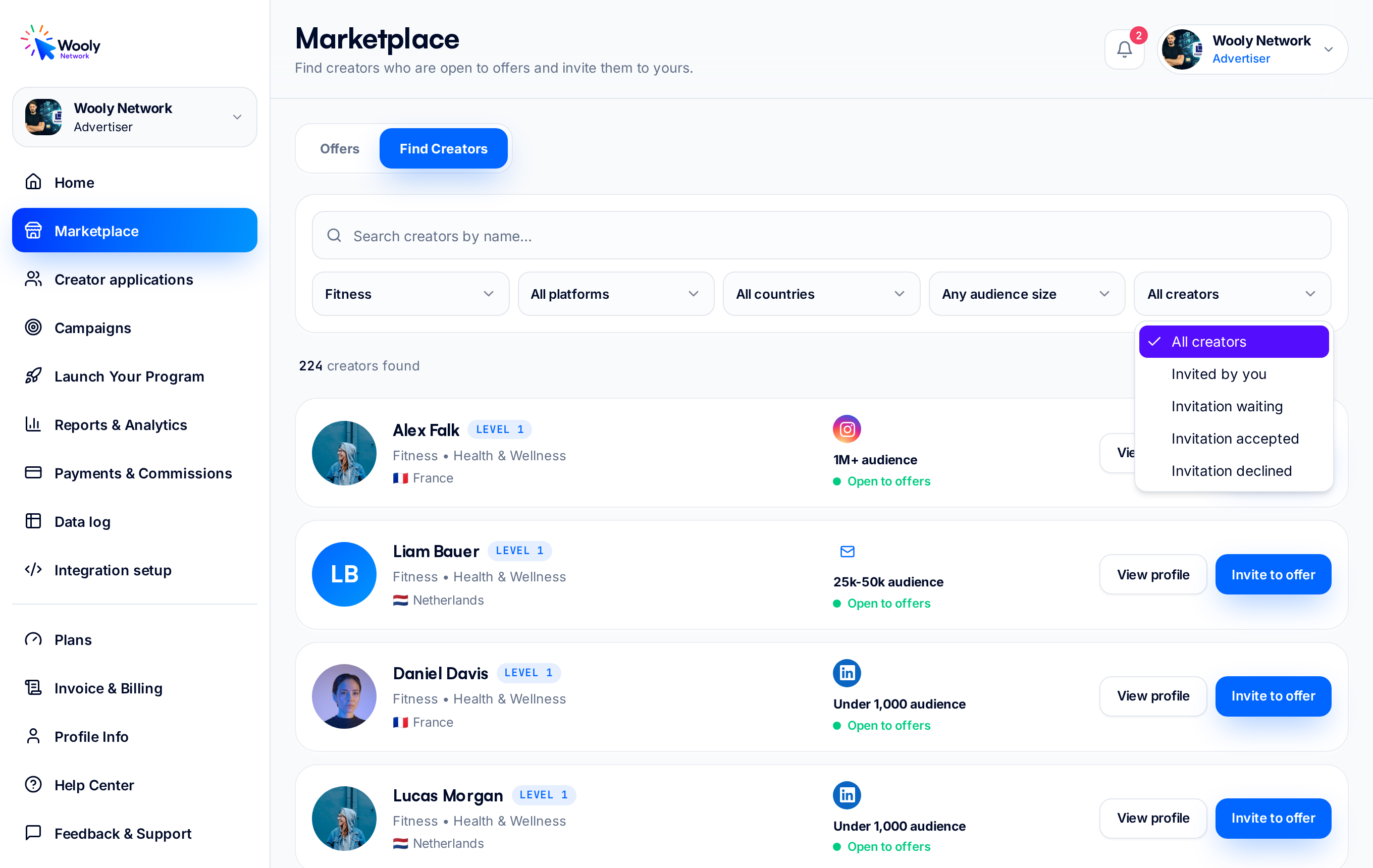
Filter the directory by invitation status to follow up, or to learn from the ones that said no.
Inviting creators is available on brand plans that include publishing campaigns. You can compare them on our pricing page.
Ready to invite
Your next partner may already be on Wooly
Choose the plan that fits your brand and send your first invitation today.
Compare plansHow creators receive and answer invitations
For creators, invitations arrive in the Marketplace, in a new Invitations tab right beside All Offers. A notification tells you when a new one lands, and the tab badge shows how many are still waiting for your answer.
Read the offer, and the note
Each invitation is the full marketplace card for the offer (here is how to read an offer on Wooly Network), under a violet ribbon that names the brand, the date, and the brand's personal note. If the brand chose automatic approval you will see Approved instantly when you accept, which means your tracking link is ready the moment you say yes. Quick filters let you see every invitation, or only those waiting, accepted or declined.
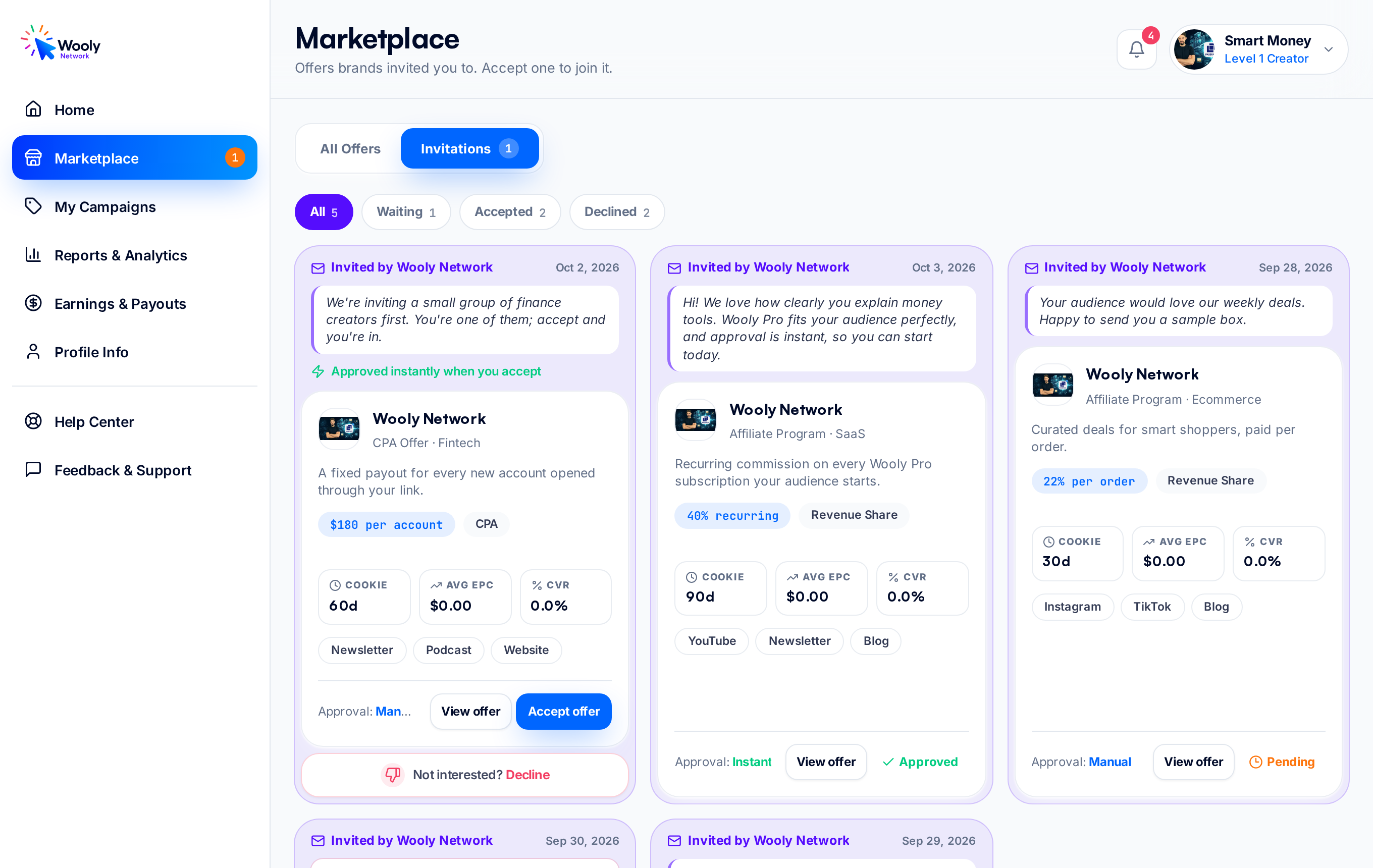
The Invitations tab. Each card shows who invited you, their note, the offer terms, and where you stand.
Accept, or decline with a reason
Accept offer joins the campaign immediately, either approved on the spot or sent to the brand for a quick review. If the offer is not right for you, choose Decline and tell the brand why in a sentence or two. A respectful no is useful to a brand, and it keeps your Invitations tab tidy. Declines are final, so take a moment to read the offer first.
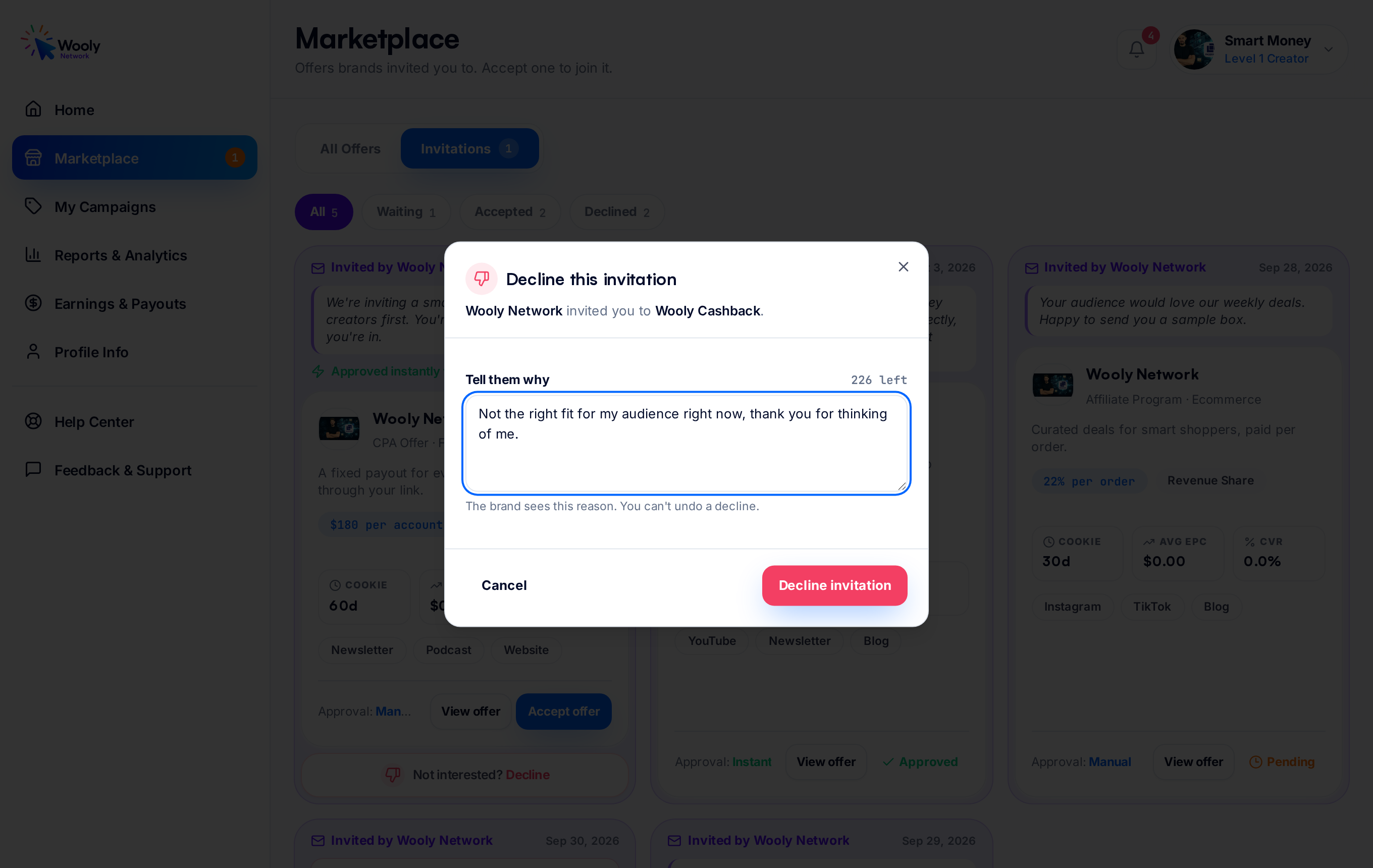
Declining takes one sentence. The brand sees your reason, and the decision is final.
You choose whether brands can find you
Being discoverable is your decision. On your Profile Info page, the Let brands find me switch controls whether you appear in Find Creators. Brands see only what they would already see if you applied to their offer: your name, photo, niches, country, language, audience size and platform links. Never your email address, and never your earnings.
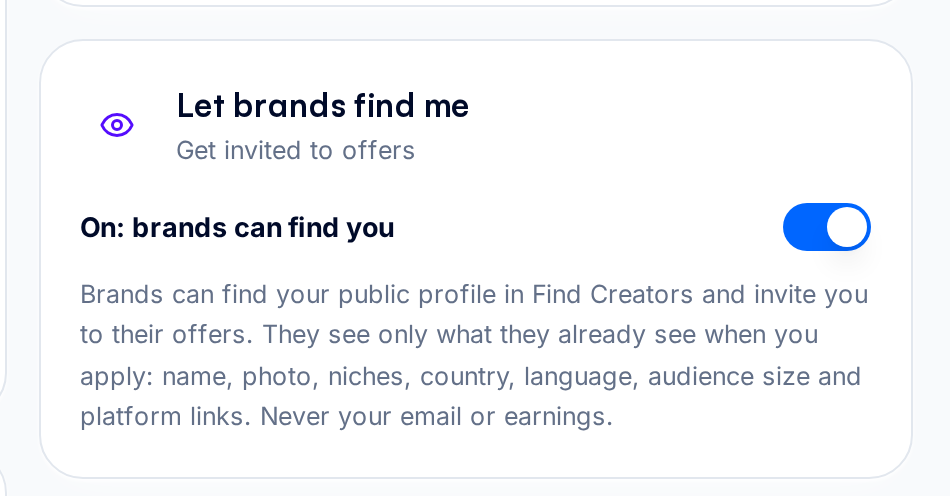
The Let brands find me switch. On by default for complete profiles, and off whenever you prefer.
Your profile is now a shop window as much as a form, so the creators who get invited most are the ones with a clear description, accurate niches and working platform links. Our guide for creators and our complete guide to affiliate marketing for creators cover how to build a profile brands respond to.
For creators
Let the offers come to you
Create your free creator account, complete your profile, and brands looking for your niche can invite you directly.
Join as a creatorFrom one marketplace to a multi marketplace
With invitations, Wooly Network now runs three connected ways to form a partnership, all sharing the same tracking, the same commission rules and the same payouts.
| Route | Who starts it | Best for |
|---|---|---|
| Offer marketplace | The creator browses and applies | Creators exploring new categories and brands that want inbound interest |
| Creator directory | The brand searches Find Creators | Brands with a precise audience, niche or market in mind |
| Direct invitation | The brand invites, the creator answers | Fast, personal partnerships with optional instant approval |
Each route feeds the others. A creator discovered in the directory may go on to browse every offer that brand runs. A brand that receives strong applications learns which profiles to look for next time. Instead of a list to scroll, the platform becomes a place where both sides are actively looking for each other, and that is what makes a marketplace grow.
Best practices for brands sending invitations
- Invite with intent. A few well matched invitations beat a long list of generic ones. Filter tightly by niche and audience before you invite.
- Personalise the note. Mention something specific about the creator's content and why your offer fits their audience.
- Match the offer to the creator. A newsletter writer and a short video creator may suit different offers from the same brand. A clear affiliate program brief helps both sides.
- Use automatic approval when you are confident. If you already chose the creator, there is no reason to make them wait.
- Read the declines. The reasons creators give are free market research on your commission, cookie window and positioning. See commission rates by industry to benchmark your offer.
- Plan your first wave. Our 30 day plan to recruit your first 10 affiliates pairs perfectly with invitations.
Best practices for creators answering invitations
- Keep your profile complete and current. Only complete profiles appear in Find Creators.
- Check the terms, not only the brand. Look at commission type, cookie window and allowed platforms before you accept.
- Answer promptly. Brands notice creators who respond, whichever way they decide.
- Decline kindly and clearly. A short reason keeps the door open for a better fitting offer later.
- Keep exploring too. Invitations add to the marketplace, they do not replace it. Here is how to find affiliate programs worth joining.
For brands and creators
Start the conversation from either side
Brands can now find and invite the creators they want. Creators can be found, invited and approved without sending a single cold message.
See how it works for brandsCommon questions
How do I invite a creator to my affiliate offer on Wooly Network?
Open Marketplace, switch to Find Creators, filter by niche, platform, country or audience size, and click Invite to offer on the creator you want. Choose one of your live offers, add an optional personal note, decide whether to approve the creator automatically if they accept, and send. The creator is notified and sees the invitation in their Invitations tab.
Do creators have to accept a brand invitation?
No. Every invitation is optional. Creators can accept, which joins them to the offer, or decline with a short reason that the brand can read. Declining has no effect on a creator's account or their other campaigns. More answers live in our FAQ.
What can brands see about me as a creator?
Only your public profile: name, photo, niches, country, language, audience size and platform links. This is the same information brands see when you apply to their offers. Your email address and your earnings are never shown.
Can I stop brands from finding me?
Yes. Turn off Let brands find me on your Profile Info page and you will no longer appear in Find Creators. You can still browse the marketplace and apply to offers as usual.
What happens after a creator accepts an invitation?
If the brand chose automatic approval, the creator is approved straight away and receives a tracking link. Otherwise the acceptance appears in the brand's Creator applications for review. Either way, the partnership then works exactly like any other on Wooly Network, with the same tracking, commission rules and payouts. Creators can follow results in Earnings and Payouts.
Is this different from an influencer marketing database?
Yes. A database gives you contact details and leaves the outreach to you. As an affiliate network, Wooly connects both sides around real offers. On Wooly Network, every creator in Find Creators has opted in, every invitation is attached to a real offer with clear commission terms, and an accepted invitation becomes a tracked, performance based partnership on the spot.
Keep reading
- Affiliate Marketing for Brands: A Complete Guide
- Affiliate Marketing for Creators: A Complete Guide
- How to Find Affiliates for Your Business
- How to Recruit Your First 10 Affiliates: A 30 Day Plan
- How to Find Affiliate Programs Worth Joining
- How to create your first Campaign
- How Wooly Network works for brands and for creators
- Brand plans and pricing, Knowledge Library and all articles
Related reading
- How to Pay Creators Safely: Escrow, Milestones and International Payouts — How to pay creators safely without losing money to no shows or late invoices, covering held funds, milestones, international payouts and basic invoicing.
- How to Measure UGC ROI: Metrics, Benchmarks and a Testing Plan — UGC ROI is the revenue your creator content generates minus what it cost to make and run. Here is the formula, the metrics that matter at each stage, and a 4 week testing plan.
- #ad, #gifted, Paid Partnership: Disclosure Rules for UGC and Gifted Products — A plain English look at disclosure rules for gifted products and paid UGC, including what counts as a material connection and how to label a post correctly.
More from the Wooly Network Blog